Events & Promotions
|
|

GMAT Club Daily Prep
Thank you for using the timer - this advanced tool can estimate your performance and suggest more practice questions. We have subscribed you to Daily Prep Questions via email.
Customized
for You
Track
Your Progress
Practice
Pays
Not interested in getting valuable practice questions and articles delivered to your email? No problem, unsubscribe here.
 Jun 11
07:00 PM EDT
-08:00 PM EDT
Discover how top MBA candidates prepare strategically for investment banking recruiting before arriving on campus. June 11th Jun 11
09:00 PM IST
-10:00 PM IST
Don’t Let the Final 90 Days Decide Your MBA Outcome by Mistake. Join this FREE live webinar to learn how to maximise your chances through Early Action and smart application planning. Jun 10
06:00 AM PDT
-06:15 PM PDT
Register for the GMAT Club Virtual MBA Spotlight Fair – the world’s premier event for serious MBA candidates. This is your chance to hear directly from Admissions Directors at nearly every Top 30 MBA program.. Jun 11
11:00 AM EDT
-12:00 PM EDT
. From MBA Admit.com and Dr. Shelle. The deadline for Wharton’s Executive MBA program is 4.5 months away! Learn to avoid 6 fatal mistakes that can SINK a Wharton Executive MBA application! Jun 12
08:30 PM IST
-09:30 PM IST
Join us for a live Coffee Chat where we discuss how applicants from competitive backgrounds can differentiate themselves and build a stronger MBA application. Jun 16
08:00 PM PDT
-09:00 PM PDT
Inquire for a free profile evaluation and guarantee statement for possible admits and scholarships!


 28 Jun 2009, 12:40
Kudos
Bookmarks
Last added part (07/29/2009): "Wow, I like it!" is not equal to "I buy it!"
Although I don't have special art education and don't familiar with special requirements of b-schools, I have 10 year experience in creating different types of presentations for different purposes. I love gmatclub community as well as Chicago Booth and would like to share my hands-on ideas with all who need them. I was thinking of this guide for 2 months and have decided to write it step by step. I hope it will help somebody without essential experience to express his or her ideas more clearly and effectively as well as to avoid typical pitfalls and mistakes in creating slide presentation. All materials presented here are just my point of view. So, take them with a grain of salt.
Schools that require slide presentation: Chicago Booth, NYU (one of the options).
TABLE OF CONTENTS (preliminary)
Introduction
Ideas
- general structure
- "Wow, I like it!" is not equal to "I buy it!"
- first slide
- last slide
- people and cats: 7-things rule
- 3-sec rule
Visual representation
- introduction: like/dislike
- Colors
- Style
- Highlighting
- Background
- Headers
- Text
- Supporting elements
- Instruments
Sample presentation
INTRODUCTION
Slide presentation (presentation) is one of the elements of an application. It is like a piece of a cake: different but harmonic and consistent part of whole thing. Therefore, the information in presentation represents new ideas and adds new dimensions to existent ones.
I've divided my guide by 2 main parts: "ideas" and "visual representation". It does not mean you should finish with ideas at first and then go to visualization. Although generating ideas are a start point of working on presentation, it is rather "back and forth" process. Sometimes, An unexpected stunning visual image can force you to rearrange structure of ideas. So, let's start.
IDEAS
general structure
4 slides = 4 ideas. I would not recommend to use a few slides for one idea. One idea per slide approach will help you to keep your presentation clear.
Some examples: introduction/personal/professional/community;
character trait 1/ character trait 2 / character trait 3 / character trait 4
introduction / past / present / future
leadership / personal / professional / future - it is structure of my presentation.
"Wow, I like it!" is not equal to "I buy it!"
Although these two stages seem to be obvious, even professionals often forget that "Wow, I Iike it!" is no equal "I buy it!". Look around, you see a lot of beautiful ads but do you really want to buy what they are offering? Why? It is very important to understand and test your presentation asking these two different questions. It is like fishing where ""Wow, I Iike it!" stands for "bait" and "I buy it!" stands for "hook". Each part is important but do not forget about hook!
Let me repeat Rhyme's example:
"...and what they really lack is meaningful content. For instance, I saw one last year where the guy used his name to spell out something like "D.A.N" = "Dedicated, Adventure...". That might be 'clever' and a bit creative, but its pretty low on the scale of actually communicating anything of consequence....".
Interesting idea that attracts attention but "empty", it doesn't add anything to "buy" question. It is possible to use such idea for your first slide only if later in your presentation you offer a lot of arguments why adcom has to "buy" you.
first slide
... It was 3rd hour of boring presentation at scientific conference. A speaker showed black and white slides with a lot of intricate formulas printed with small size of font commenting them with his lulling voice. it was stifling. I lost reasoning of speaker speech after his first words and was fighting with nap. Majority of people did the same and even a few old professors quietly slept with serious faces expressed illusion of attention and intense work of mind. Sometimes they began to snore but their colleagues pushed them avoiding big awkward situation. "Don't sleep, don't sleep!" - I repeated to myself. The speaker finished and next speaker, professor from Japan, appeared on the stage.
Suddenly, laud and cheerful voice of the professor filled out the conference hall. Beautiful photo of green rows of wheat and blue sky flooded screen. The professor talked about connection between order in our worlds and world of atoms but I didn't listen to him, I was among juicy stems of wheat and felt as fresh spring wind blows in my face. I saw clean sky and waving fresh ears of wheat. "What's going on?!". In a moment I suddenly realized that I was live, fresh and happy. I absorbed all information about atomic order from the professor's report. I looked around: All seemed to return from beautiful realm of Japanese fields....
This odd story is a real story that illustrates how one unexpected colorful slide and a few connecting sentences can make unbelievable effect. It would be great if you can make such "Wow" effect at first slide and pull reader/viewer out of his or her routine.
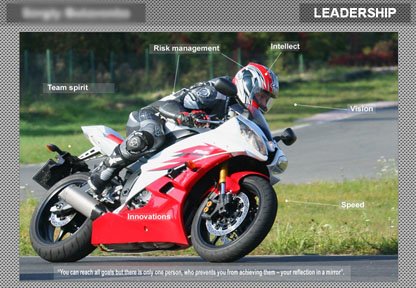
Example: My first slide - not "wheat and sky" but interesting:
slide1.jpg [ 78.74 KiB | Viewed 55324 times ]
It the slide I illustrate my understanding of leadership through riding motobike and present my motto: "You can reach all goals but there is only one person, who prevents you from achieving them - your reflection in a mirror".
last slide
Last slide is less important than first one but more important than middle slides. Physiologists say that people remember first and last words. So, that is why first and last slides weigh more. In most cases your last slide is your last idea in your package. Therefore, I would recommend to use something like conclusion: your future, you in school, last achievement, main trait that is crucial for business and so on.
people and cats: 7-things rule
There is threshold between "separate" and "many". Cats can perceive up to 3 things as separate things. People can perceive up to 7 things as separate ones. This is what my teachers said me. So, I would recommend use not more than 7 (or better not more than 5) subordinate ideas in one slide. For example, your slide describes "Future". You can divide it by 4 parts: school, 2 years after graduation, 5 years, 15 years. But it is worse to use: school, 2 years after graduation, 4 years, 7 years, 10 years, 15 years, 20 years, 30 years, 40 years. Last example looks like mess.
3-sec rule
Your idea should be expressed clearly and be understood in 2-3 seconds. Our mind forms first assessment of visual information very fast (our predecessors must react fast in jungle to survive). So, if somebody cannot understand what you are going to say with the slide, his or her first assessment will be rather negative.
Although I don't have special art education and don't familiar with special requirements of b-schools, I have 10 year experience in creating different types of presentations for different purposes. I love gmatclub community as well as Chicago Booth and would like to share my hands-on ideas with all who need them. I was thinking of this guide for 2 months and have decided to write it step by step. I hope it will help somebody without essential experience to express his or her ideas more clearly and effectively as well as to avoid typical pitfalls and mistakes in creating slide presentation. All materials presented here are just my point of view. So, take them with a grain of salt.
Schools that require slide presentation: Chicago Booth, NYU (one of the options).
TABLE OF CONTENTS (preliminary)
Introduction
Ideas
- general structure
- "Wow, I like it!" is not equal to "I buy it!"
- first slide
- last slide
- people and cats: 7-things rule
- 3-sec rule
Visual representation
- introduction: like/dislike
- Colors
- Style
- Highlighting
- Background
- Headers
- Text
- Supporting elements
- Instruments
Sample presentation
INTRODUCTION
Slide presentation (presentation) is one of the elements of an application. It is like a piece of a cake: different but harmonic and consistent part of whole thing. Therefore, the information in presentation represents new ideas and adds new dimensions to existent ones.
I've divided my guide by 2 main parts: "ideas" and "visual representation". It does not mean you should finish with ideas at first and then go to visualization. Although generating ideas are a start point of working on presentation, it is rather "back and forth" process. Sometimes, An unexpected stunning visual image can force you to rearrange structure of ideas. So, let's start.
IDEAS
general structure
4 slides = 4 ideas. I would not recommend to use a few slides for one idea. One idea per slide approach will help you to keep your presentation clear.
Some examples: introduction/personal/professional/community;
character trait 1/ character trait 2 / character trait 3 / character trait 4
introduction / past / present / future
leadership / personal / professional / future - it is structure of my presentation.
"Wow, I like it!" is not equal to "I buy it!"
Although these two stages seem to be obvious, even professionals often forget that "Wow, I Iike it!" is no equal "I buy it!". Look around, you see a lot of beautiful ads but do you really want to buy what they are offering? Why? It is very important to understand and test your presentation asking these two different questions. It is like fishing where ""Wow, I Iike it!" stands for "bait" and "I buy it!" stands for "hook". Each part is important but do not forget about hook!
Let me repeat Rhyme's example:
"...and what they really lack is meaningful content. For instance, I saw one last year where the guy used his name to spell out something like "D.A.N" = "Dedicated, Adventure...". That might be 'clever' and a bit creative, but its pretty low on the scale of actually communicating anything of consequence....".
Interesting idea that attracts attention but "empty", it doesn't add anything to "buy" question. It is possible to use such idea for your first slide only if later in your presentation you offer a lot of arguments why adcom has to "buy" you.
first slide
... It was 3rd hour of boring presentation at scientific conference. A speaker showed black and white slides with a lot of intricate formulas printed with small size of font commenting them with his lulling voice. it was stifling. I lost reasoning of speaker speech after his first words and was fighting with nap. Majority of people did the same and even a few old professors quietly slept with serious faces expressed illusion of attention and intense work of mind. Sometimes they began to snore but their colleagues pushed them avoiding big awkward situation. "Don't sleep, don't sleep!" - I repeated to myself. The speaker finished and next speaker, professor from Japan, appeared on the stage.
Suddenly, laud and cheerful voice of the professor filled out the conference hall. Beautiful photo of green rows of wheat and blue sky flooded screen. The professor talked about connection between order in our worlds and world of atoms but I didn't listen to him, I was among juicy stems of wheat and felt as fresh spring wind blows in my face. I saw clean sky and waving fresh ears of wheat. "What's going on?!". In a moment I suddenly realized that I was live, fresh and happy. I absorbed all information about atomic order from the professor's report. I looked around: All seemed to return from beautiful realm of Japanese fields....
This odd story is a real story that illustrates how one unexpected colorful slide and a few connecting sentences can make unbelievable effect. It would be great if you can make such "Wow" effect at first slide and pull reader/viewer out of his or her routine.
Example: My first slide - not "wheat and sky" but interesting:
Attachment:
slide1.jpg [ 78.74 KiB | Viewed 55324 times ]
last slide
Last slide is less important than first one but more important than middle slides. Physiologists say that people remember first and last words. So, that is why first and last slides weigh more. In most cases your last slide is your last idea in your package. Therefore, I would recommend to use something like conclusion: your future, you in school, last achievement, main trait that is crucial for business and so on.
people and cats: 7-things rule
There is threshold between "separate" and "many". Cats can perceive up to 3 things as separate things. People can perceive up to 7 things as separate ones. This is what my teachers said me. So, I would recommend use not more than 7 (or better not more than 5) subordinate ideas in one slide. For example, your slide describes "Future". You can divide it by 4 parts: school, 2 years after graduation, 5 years, 15 years. But it is worse to use: school, 2 years after graduation, 4 years, 7 years, 10 years, 15 years, 20 years, 30 years, 40 years. Last example looks like mess.
3-sec rule
Your idea should be expressed clearly and be understood in 2-3 seconds. Our mind forms first assessment of visual information very fast (our predecessors must react fast in jungle to survive). So, if somebody cannot understand what you are going to say with the slide, his or her first assessment will be rather negative.
VISUAL REPRESENTATION
Introduction: like/dislike
Although admission committees say that design is not important, it's mostly true unless you mess it up. So, how not to mess it up without even knowing it? First of all, it has to be visually pleasant or at least okay. We like flowers but don't like, let's say, garbage. We like fresh red-ripe apple but dislike rotten apple. Let's see example,

like_dislike.jpg [ 6.51 KiB | Viewed 48090 times ]
I think second slide does not induce positive feelings.
Colors
There are a few ways how to represent color. One of the popular ways is RGB (red, green, blue) representation. But in a presentation it is better to think about HSB (Hue, Saturation, Brightness).
Omitting details, it is important to know a few rules:
1) In most cases using colors with slightly different hue is not recommended, unless you use them in gradients and know what you're doing. So, if you need 4 different types of blue, use one hue for all. It's just safer.

hue.png [ 1.29 KiB | Viewed 48008 times ]
You can visually see that second set of colors is unmatched.
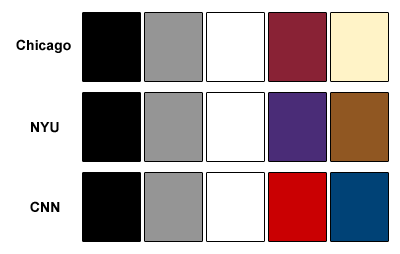
2) Black, white and gray colors have no hue and fit all other colors. So, Black-Gray-White-Color is 99% working scheme. Examples of the most popular color schemes:

schemes_1.png [ 534 Bytes | Viewed 47990 times ]
When I say B/G/W - Color scheme, I mean you can use all types of gray and all types of the color (hue=constant)
3) It is possible to use a color scheme with two colors that differ from each other: Black-Gray-White- 2 Colors scheme examples:
schemes_2.png [ 2.31 KiB | Viewed 47961 times ]
Style
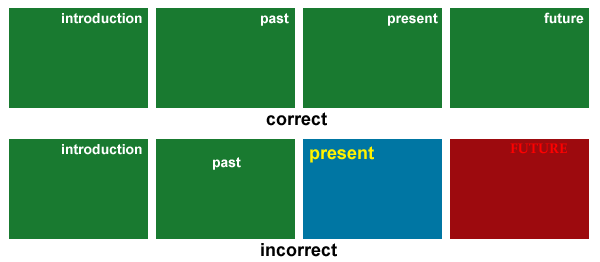
Although all 4 slides represent different ideas, they should have something in common. You need to do so to make smooth transition from one idea to next idea and do not force your viewer to understand each time what style you use to express headers, comments and so on. So, if you use top right corner of slide for title of a slide, use it for all slides. See examples,
style1.png [ 6.71 KiB | Viewed 47838 times ]
It is possible to change style, at least a few elements for first slide.
Highlighting
Often we need to highlight something to show that we stand out.
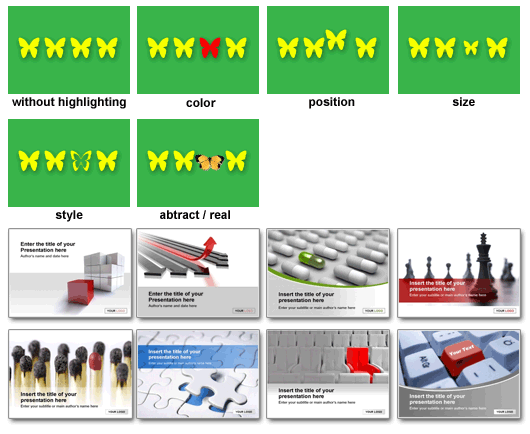
Follow general rule: set of the same objects + object with ONE different attribute. See examples,
highlights.png [ 37.53 KiB | Viewed 47757 times ]
When I wrote this post I found google advertisement at the bottom of the page with templates for presentations. They are good. Although I would not recommend to use it for MBA application (You need to be personal and unique) but it is good illustration of almost all principles and rules I describe here (You can see black-gray-white- 1 color scheme in all slides). site: https://www.presentationload.com
Background
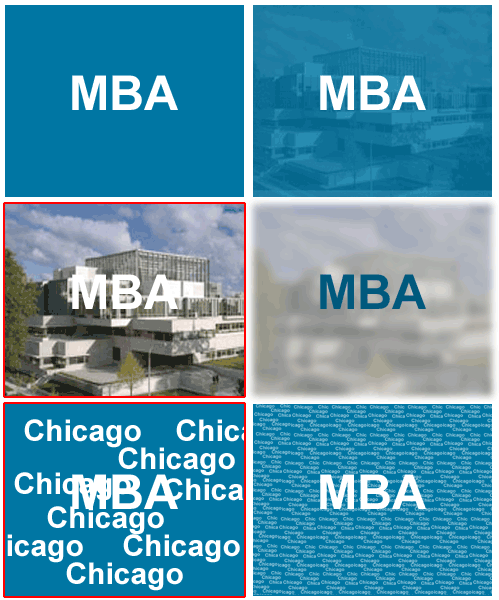
Background helps us to make our presentation more attractive. At the same time, wrong background can essentially hurt presentation. What is a general rule? Simple: Background must be secondary element of presentation. In other words, background helps to attract attention to main elements but does not catch attention itself. So, a few rules:
1) low contrast
2) size of details should be essentially larger or smaller than that of main elements.
Let see examples,
background.png [ 45.37 KiB | Viewed 47692 times ]
I used red frame to show wrong backgrounds.
Headers
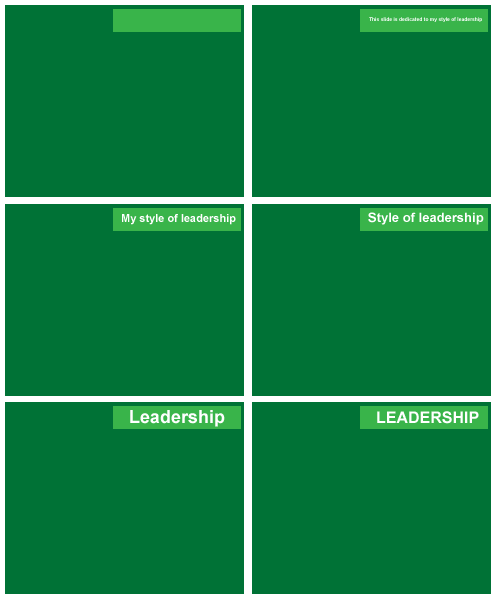
Main rule is simple: Header is the SHORTEST possible phrase or word that conveys undistorted idea. Let's see an example of evolution of a header:
- This slide is dedicated to my style of leadership. Hm, first 5 words do not convey any useful information, they are fluff.
- My style of leadership. It is my presentation! So, "my" is useless.
- Style of leadership. Do I really need "style of"? I don't think so.
- Leadership - Great.
Now, see why we need short headers in presentation:
headers.png [ 3.46 KiB | Viewed 47644 times ]
Do you see now why we need short headers? To make them big and attract attention. In the last slide I used upper case characters to make the header even visually bigger in the same space. Do you have OG12? Look how GMAC writes word "Review". But let's talk about fonts in the next section.
Text
For simplicity I would say text can be characterized by two general attributes: size and style. You can play with style (different fonts, weight, spaces and so on) as you want but keep in mind a few bold rules:
1) Size of text must corresponds to place of text in hierarchy
2) Use the same size&style for texts of the same hierarchy level.
And one more advice: Use Arial as the most typical font.
Supporting elements
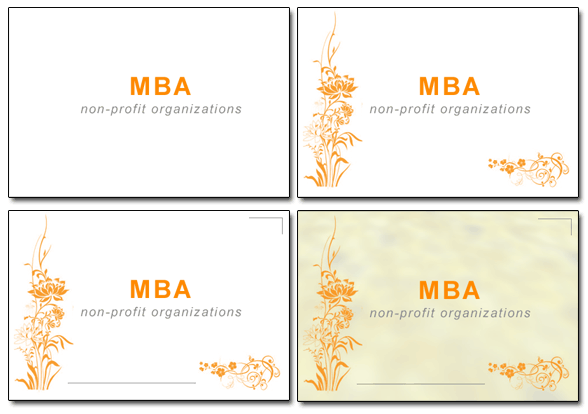
In most cases we can increase attractiveness of presentation by adding supporting elements. The elements can be different graphical elements that support or add small part of information to presentation. Let see how we can use support elements for first slide of presentation of the girl who want to work for non-profit organizations.
support.png [ 38.44 KiB | Viewed 47450 times ]
if you find this information useful and want to give me kudo, please, give it to the first post in the thread.
to be continued....
See also information posted by [rhyme], [terp26]
Introduction: like/dislike
Although admission committees say that design is not important, it's mostly true unless you mess it up. So, how not to mess it up without even knowing it? First of all, it has to be visually pleasant or at least okay. We like flowers but don't like, let's say, garbage. We like fresh red-ripe apple but dislike rotten apple. Let's see example,
Attachment:
like_dislike.jpg [ 6.51 KiB | Viewed 48090 times ]
Colors
There are a few ways how to represent color. One of the popular ways is RGB (red, green, blue) representation. But in a presentation it is better to think about HSB (Hue, Saturation, Brightness).
Omitting details, it is important to know a few rules:
1) In most cases using colors with slightly different hue is not recommended, unless you use them in gradients and know what you're doing. So, if you need 4 different types of blue, use one hue for all. It's just safer.
Attachment:
hue.png [ 1.29 KiB | Viewed 48008 times ]
2) Black, white and gray colors have no hue and fit all other colors. So, Black-Gray-White-Color is 99% working scheme. Examples of the most popular color schemes:
Attachment:
schemes_1.png [ 534 Bytes | Viewed 47990 times ]
3) It is possible to use a color scheme with two colors that differ from each other: Black-Gray-White- 2 Colors scheme examples:
Attachment:
schemes_2.png [ 2.31 KiB | Viewed 47961 times ]
Style
Although all 4 slides represent different ideas, they should have something in common. You need to do so to make smooth transition from one idea to next idea and do not force your viewer to understand each time what style you use to express headers, comments and so on. So, if you use top right corner of slide for title of a slide, use it for all slides. See examples,
Attachment:
style1.png [ 6.71 KiB | Viewed 47838 times ]
Highlighting
Often we need to highlight something to show that we stand out.
Follow general rule: set of the same objects + object with ONE different attribute. See examples,
Attachment:
highlights.png [ 37.53 KiB | Viewed 47757 times ]
Background
Background helps us to make our presentation more attractive. At the same time, wrong background can essentially hurt presentation. What is a general rule? Simple: Background must be secondary element of presentation. In other words, background helps to attract attention to main elements but does not catch attention itself. So, a few rules:
1) low contrast
2) size of details should be essentially larger or smaller than that of main elements.
Let see examples,
Attachment:
background.png [ 45.37 KiB | Viewed 47692 times ]
Headers
Main rule is simple: Header is the SHORTEST possible phrase or word that conveys undistorted idea. Let's see an example of evolution of a header:
- This slide is dedicated to my style of leadership. Hm, first 5 words do not convey any useful information, they are fluff.
- My style of leadership. It is my presentation! So, "my" is useless.
- Style of leadership. Do I really need "style of"? I don't think so.
- Leadership - Great.
Now, see why we need short headers in presentation:
Attachment:
headers.png [ 3.46 KiB | Viewed 47644 times ]
Text
For simplicity I would say text can be characterized by two general attributes: size and style. You can play with style (different fonts, weight, spaces and so on) as you want but keep in mind a few bold rules:
1) Size of text must corresponds to place of text in hierarchy
2) Use the same size&style for texts of the same hierarchy level.
And one more advice: Use Arial as the most typical font.
Supporting elements
In most cases we can increase attractiveness of presentation by adding supporting elements. The elements can be different graphical elements that support or add small part of information to presentation. Let see how we can use support elements for first slide of presentation of the girl who want to work for non-profit organizations.
Attachment:
support.png [ 38.44 KiB | Viewed 47450 times ]
if you find this information useful and want to give me kudo, please, give it to the first post in the thread.
to be continued....
See also information posted by [rhyme], [terp26]
28 Jun 2009, 12:40
Kudos
Bookmarks
I'm adding this info almost 2 years after I posted my guide. The reason for that is to recommend a good book (maybe books) that can help you it your way.
Here is first one:
1. "Made to stick" by Chip Heath & Dan Heath. [Amazon]. It's a great book about how to make your ideas stick. There is a keyword there: "SUCCESS" - Simple, Unexpected, Concrete, Credible, Emotional, Stories. I guess it's exactly what we need for a great presentation.
Here is first one:
1. "Made to stick" by Chip Heath & Dan Heath. [Amazon]. It's a great book about how to make your ideas stick. There is a keyword there: "SUCCESS" - Simple, Unexpected, Concrete, Credible, Emotional, Stories. I guess it's exactly what we need for a great presentation.