Events & Promotions
|
|

GMAT Club Daily Prep
Thank you for using the timer - this advanced tool can estimate your performance and suggest more practice questions. We have subscribed you to Daily Prep Questions via email.
Customized
for You
Track
Your Progress
Practice
Pays
Not interested in getting valuable practice questions and articles delivered to your email? No problem, unsubscribe here.
 Sep 09
07:00 AM PDT
-10:00 AM PDT
Meet AdComs and explore top Master’s programs - MiM, MiF, MSc, MSBA and more. - Application Fee Waivers - Free 1-Week of GMAT Club Tests: - Master's Application Toolkit - Grand Prize Giveaway- Sep 09
10:00 AM PDT
-11:00 AM PDT
Three MBA applications. Three rejections. No interview invites. A year later, Aman was admitted to Cambridge Judge, SMU, and IMD. In this episode of MBA Admit Stories, Aman shares how he rebuilt his MBA application...  Sep 04
10:00 AM EDT
-11:59 PM EDT
We’ve worked incredibly hard to build TTP into the best test prep experience possible, and it would mean a lot to us to win Newsweek’s 2026 Readers’ Choice Award for Best Test Prep. If TTP has helped you, we’d be incredibly grateful for your vote. Sep 08
12:30 AM EDT
-01:30 AM EDT
Looking for your GMAT motivation to break through the score plateau? Pragati improved her score by massive 160 points with strategic guidance and hard-work! Find out how personalized mentorship and a strong mindset can turn GMAT struggles into success. Sep 10
01:00 AM EDT
-02:00 AM EDT
Learn how Keshav, a Chartered Accountant, scored an impressive 705 on GMAT in just 30 days with GMATWhiz's expert guidance. In this video, he shares preparation tips and strategies that worked for him, including the mock, time management, and more. Sep 10
08:00 PM PDT
-09:00 PM PDT
Free- full-length test + 15 concept videos + 150+ short videos + study plan!


I've been using walker's GMAT Timer application while taking practice tests and it works great. However I found that I wanted to time myself even when I was not doing practice tests.
For example while working on a set of 20 CR questions I wanted to know how much time I took on each question. I tried doing this with the GMAT Timer but found it a bit difficult as it provides only standard 37/41 question options.
Hence, I wrote a simple application that can be used both as a stopwatch and a countdown timer. I've been using this whenever I do practice questions regardless of how many questions are there. It's helping me actively perform time management even in non-test conditions.
Thought it might help some of you folks out there so I'll upload it here.
Sid
P.S: Please do let me know if there are any bugs and I'll try fixing them immediately.
Works on Windows and requires .NET 3.0 (most people have this. In case you don't you can freely download it @ https://www.microsoft.com/downloads/deta ... laylang=en
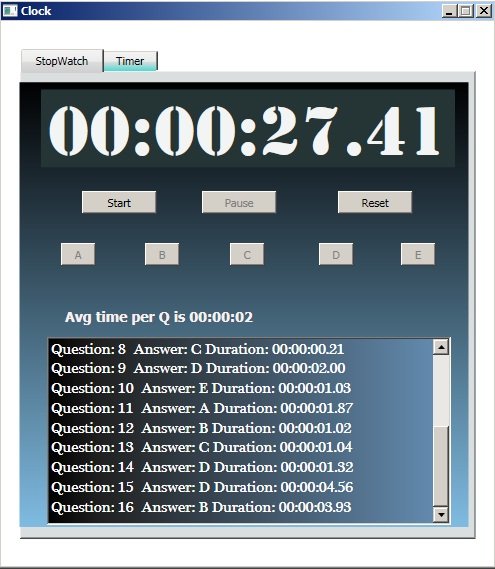
StopwatchCountdownTimer.jpg [ 96.49 KiB | Viewed 11450 times ]
Edit: Updated with a few bug fixes - made more user friendly.
For example while working on a set of 20 CR questions I wanted to know how much time I took on each question. I tried doing this with the GMAT Timer but found it a bit difficult as it provides only standard 37/41 question options.
Hence, I wrote a simple application that can be used both as a stopwatch and a countdown timer. I've been using this whenever I do practice questions regardless of how many questions are there. It's helping me actively perform time management even in non-test conditions.
Thought it might help some of you folks out there so I'll upload it here.
Sid
P.S: Please do let me know if there are any bugs and I'll try fixing them immediately.
Works on Windows and requires .NET 3.0 (most people have this. In case you don't you can freely download it @ https://www.microsoft.com/downloads/deta ... laylang=en
Attachment:
StopwatchCountdownTimer.jpg [ 96.49 KiB | Viewed 11450 times ]
Attachments
 TimerStopwatch.zip [10.66 KiB]
Downloaded 780 times


 14 Mar 2010, 15:20
Kudos
Bookmarks
Fantastic job - thank you!!!
Walker will be very proud
Walker will be very proud
 22 Aug 2012, 05:19
Kudos
Bookmarks
i wished there cud have been a similar app which worked for my phone as well