Events & Promotions
|
|

GMAT Club Daily Prep
Thank you for using the timer - this advanced tool can estimate your performance and suggest more practice questions. We have subscribed you to Daily Prep Questions via email.
Customized
for You
Track
Your Progress
Practice
Pays
Not interested in getting valuable practice questions and articles delivered to your email? No problem, unsubscribe here.
 Sep 03
11:00 AM PDT
-12:00 PM PDT
We go inside the MIT Sloan School of Management with Donna Levinson, Assistant Dean of Admissions at MIT Sloan, for a detailed conversation on Sloan’s MBA experience, curriculum, global community, application process, and admissions philosophy. Sep 03
01:00 PM PDT
-02:00 PM PDT
Meet Tuck at an informal student or staff-hosted coffee chat in a city near you! Next dates are in Irvine, CA and Washington, DC Sep 03
09:00 PM IST
-10:00 AM IST
Join our free webinar on building a stronger Round 2 MBA application for INSEAD, LBS, Kellogg, HEC & other T20 B-schools after missing Round 1. Learn what actually changes in Round 2 and rebuild your candidacy. Sep 02
01:00 PM EDT
-11:59 PM EDT
Take 30% off all study plans with code COURSEWORK - Expires on Monday 9/7- Sep 04
10:00 AM PDT
-11:00 AM PDT
What does test anxiety really look like on the GMAT? For many test takers, it does not look like a panic attack. Instead, it shows up as brain fog, rereading, negative comparisons, mental noise....  Sep 04
12:00 PM EDT
-01:00 PM EDT
The old MBA recruiting playbook is dead. Here’s how top admits are getting ahead this summer. Sep 06
09:30 AM EDT
-12:30 PM EST
Top scores are possible when you enroll in a powerful EA course, taught live online + 6 months access to TTP OnDemand video courses included! Perfect class schedule and easy course access for working professionals. Class starts Sundays Sept. 6, 2026.- Sep 07
12:01 AM PDT
-11:59 PM PDT
On the 7th, GMAT Club Tests will be Free! Including all the Quizzes, Questions, and Tests. 12 AM - 11:59 PM PDT - Sep 09
07:00 AM PDT
-10:00 AM PDT
Meet AdComs and explore top Master’s programs - MiM, MiF, MSc, MSBA and more. - Application Fee Waivers - Free 1-Week of GMAT Club Tests: - Master's Application Toolkit - Grand Prize Giveaway  Sep 09
12:00 PM PDT
-01:00 PM PDT
The old MBA recruiting playbook is dead. Here’s how top admits are getting ahead this summer. Sep 15
07:00 PM EDT
-09:00 PM EST
Elite scores are possible when you enroll in a powerful GMAT course, taught live online + 6 months access to TTP OnDemand video courses included! Class starts Tues/Thurs Sept. 15, 2026 - Nov. 15, 2027, 7:00pm-9:00pm EST Sep 21
08:00 PM EDT
-10:00 PM EDT
Boost your GMAT score in less than one month in a live online class + 6 months access to TTP OnDemand video courses included! Class starts Mon, Tues, Wed, Thur, Fri Sept. 21, 2026 - Oct. 9, 2027, 7:00pm-10:00pm EST


 27 Sep 2018, 20:36
Kudos
Bookmarks
Hey bb
When I try to download my error log, it does not download it in the sorted format. Spreadsheet does get downloaded in the sorted format only when I had more than 2 pages of error log and I do the following steps:
1) Sort by desired column.
2) Click on only other page except 1st (i.e. Page 2)
3) Come back to Page 1.
4) Download the excel, which has sorted data.
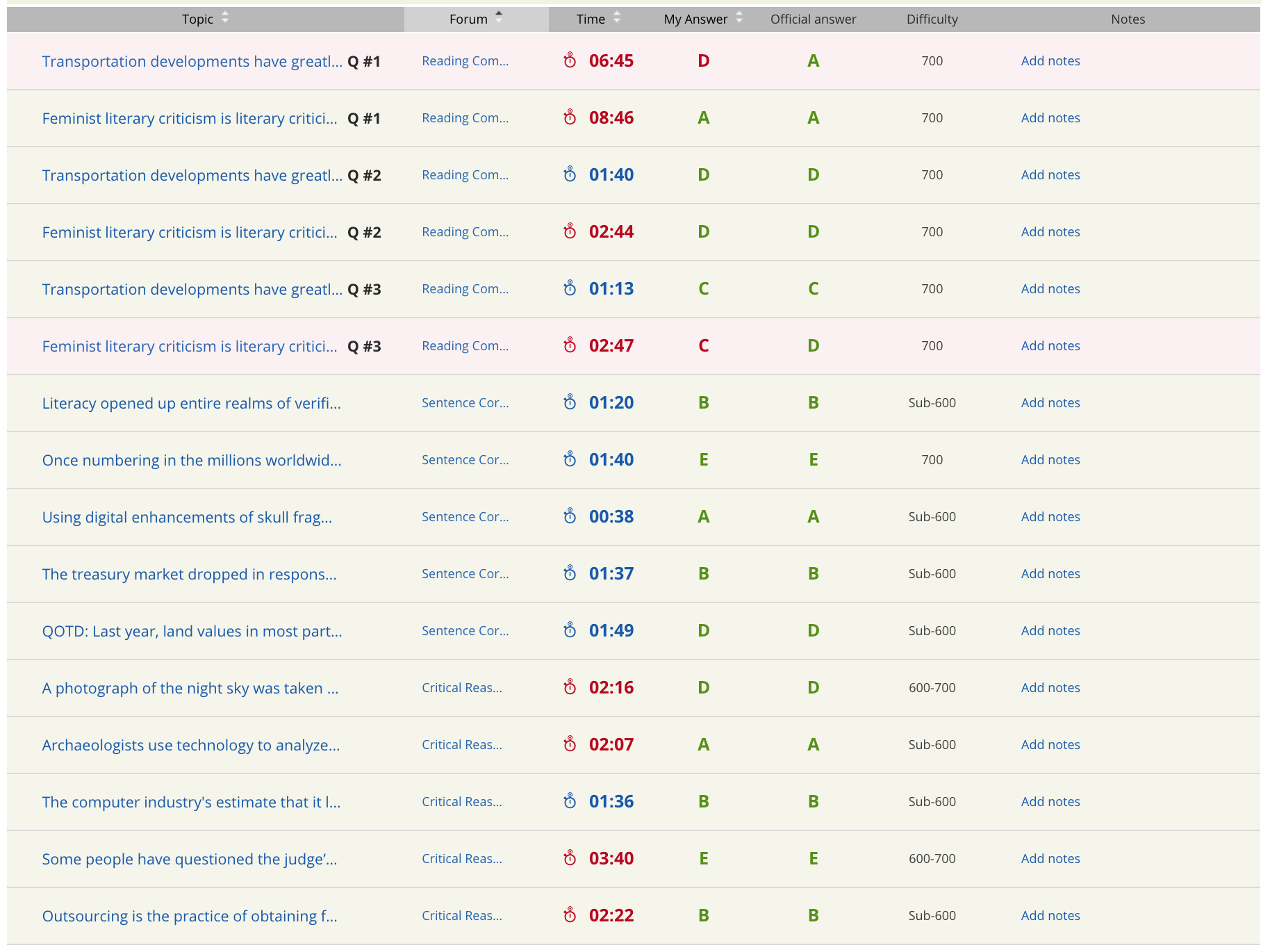
Error Log (Sorted).png [ 337.5 KiB | Viewed 1112 times ]
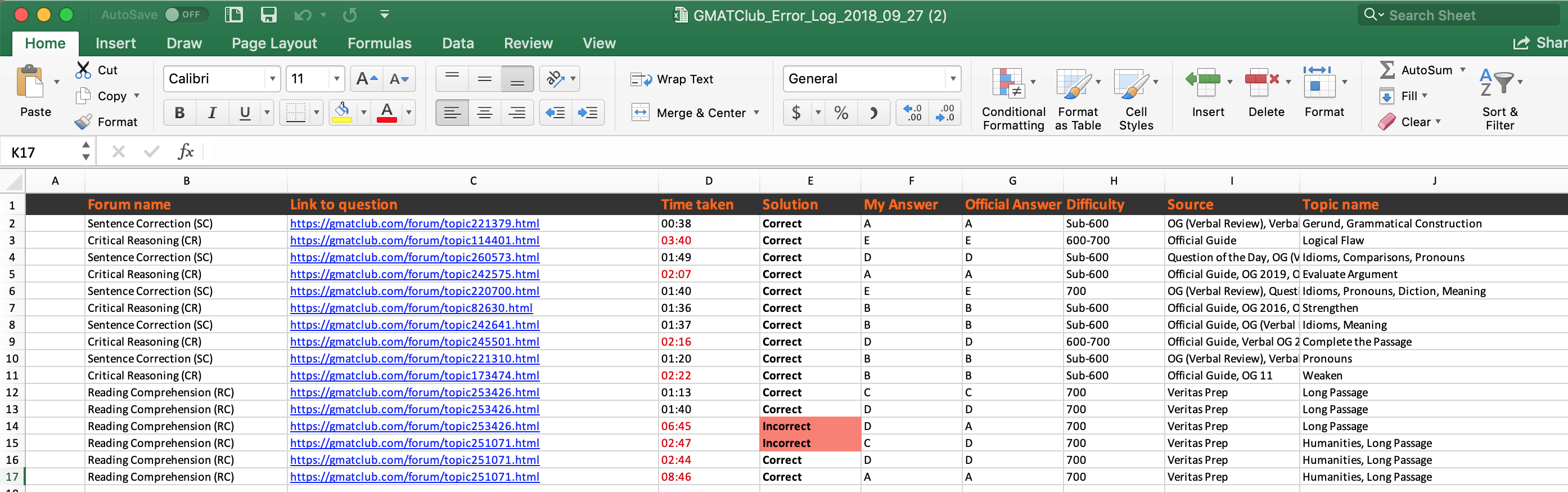
Downloaded Excel (Unsorted).png [ 518.49 KiB | Viewed 1118 times ]
Right now when we download the spreadsheet and want to calculate the average of timers, then we need to manually click on each cell so that they get right aligned, a format that's needed for Excel in order to use the AVERAGE function. Currently, timer column looks like the one as shown in Downloaded Excel (Unsorted).png above. If it can be in the format shown below, then would be pretty useful when one has too many rows.
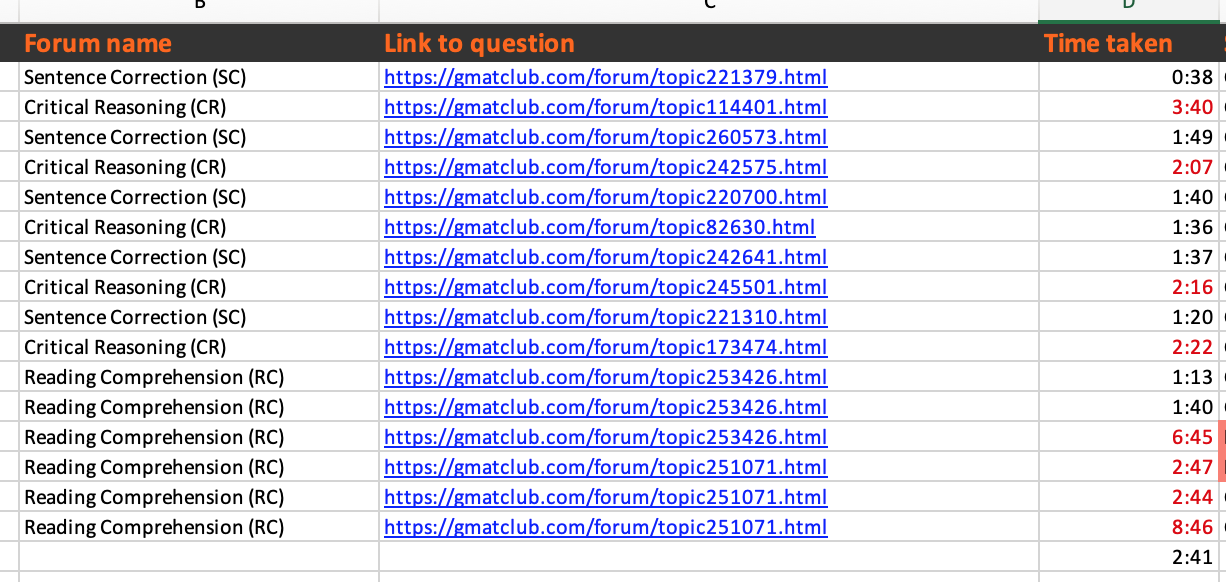
Feature Request (Timers in correct format - Right aligned).png [ 184.58 KiB | Viewed 1078 times ]
Bug
When I try to download my error log, it does not download it in the sorted format. Spreadsheet does get downloaded in the sorted format only when I had more than 2 pages of error log and I do the following steps:
1) Sort by desired column.
2) Click on only other page except 1st (i.e. Page 2)
3) Come back to Page 1.
4) Download the excel, which has sorted data.
Attachment:
Error Log (Sorted).png [ 337.5 KiB | Viewed 1112 times ]
Attachment:
Downloaded Excel (Unsorted).png [ 518.49 KiB | Viewed 1118 times ]
Another Suggestion:
Right now when we download the spreadsheet and want to calculate the average of timers, then we need to manually click on each cell so that they get right aligned, a format that's needed for Excel in order to use the AVERAGE function. Currently, timer column looks like the one as shown in Downloaded Excel (Unsorted).png above. If it can be in the format shown below, then would be pretty useful when one has too many rows.
Attachment:
Feature Request (Timers in correct format - Right aligned).png [ 184.58 KiB | Viewed 1078 times ]


 27 Sep 2018, 22:49
Kudos
Bookmarks
Thx. Really appreciate reporting this. This is pretty helpful. Unfortunately I’m headed to bed right now  and I will reply tomorrow. Appreciate your patience with this and me
Posted from my mobile device
and I will reply tomorrow. Appreciate your patience with this and me Posted from my mobile device