Events & Promotions
|
|

GMAT Club Daily Prep
Thank you for using the timer - this advanced tool can estimate your performance and suggest more practice questions. We have subscribed you to Daily Prep Questions via email.
Customized
for You
Track
Your Progress
Practice
Pays
Not interested in getting valuable practice questions and articles delivered to your email? No problem, unsubscribe here.
 Sep 02
01:00 PM EDT
-11:59 PM EDT
Take 30% off all study plans with code COURSEWORK - Expires on Monday 9/7 Sep 04
01:30 AM EDT
-02:30 AM EDT
This Labor Day, turn your hard work into real score gains. From 615→715 in 15 days to 705 in 30 days, our students prove what's possible with personalized, expert guidance. Save up to 25% on 1-on-1 tutoring. Sep 04
10:00 AM EDT
-11:59 PM EDT
We’ve worked incredibly hard to build TTP into the best test prep experience possible, and it would mean a lot to us to win Newsweek’s 2026 Readers’ Choice Award for Best Test Prep. If TTP has helped you, we’d be incredibly grateful for your vote. Sep 06
09:30 AM EDT
-12:30 PM EST
Top scores are possible when you enroll in a powerful EA course, taught live online + 6 months access to TTP OnDemand video courses included! Perfect class schedule and easy course access for working professionals. Class starts Sundays Sept. 6, 2026. Sep 07
12:01 AM PDT
-11:59 PM PDT
On the 7th, GMAT Club Tests will be Free! Including all the Quizzes, Questions, and Tests. 12 AM - 11:59 PM PDT Sep 07
12:30 AM EDT
-01:30 AM EDT
Tejas studied hard but kept repeating the same mistakes. After 3 attempts at 645, a focused 4-week strategy helped him identify and fix what was holding him back—leading to a 695 with just 12–15 hours of study per week.- Sep 07
10:00 AM PDT
-11:00 AM PDT
A complete walkthrough of GMAT Club’s free 12-week GMAT study plan: what you study each week, how progress and goals are tracked, how the error log works, and how your practice unlocks paid tools at no cost. - Sep 08
11:00 AM PDT
-12:00 PM PDT
Strong applicants do not always write strong MBA essays. In this session, we break down 5 common MBA essay mistakes that can quietly weaken an otherwise competitive application. - Sep 09
07:00 AM PDT
-10:00 AM PDT
Meet AdComs and explore top Master’s programs - MiM, MiF, MSc, MSBA and more. - Application Fee Waivers - Free 1-Week of GMAT Club Tests: - Master's Application Toolkit - Grand Prize Giveaway - Sep 09
10:00 AM PDT
-11:00 AM PDT
Three MBA applications. Three rejections. No interview invites. A year later, Aman was admitted to Cambridge Judge, SMU, and IMD. In this episode of MBA Admit Stories, Aman shares how he rebuilt his MBA application...  Sep 09
12:00 PM PDT
-01:00 PM PDT
The old MBA recruiting playbook is dead. Here’s how top admits are getting ahead this summer.- Sep 10
11:00 AM PDT
-12:00 PM PDT
What does a truly strong MBA application resume actually look like? In this session, we break down 3 real MBA resumes from successful applicants who got into top business schools. Using redacted before-and-after versions...  Sep 10
12:00 PM IST
-01:00 PM IST
Before you hit “Submit,” get an expert perspective on your MBA application. Our Test Drive Service (Comprehensive Application Review) provides an in-depth evaluation of your application, helping you identify gaps, strengthen your story, and more. Sep 10
03:00 PM PDT
-04:00 PM PDT
Inquire for a free profile evaluation and guarantee statement for possible admits and scholarships! Sep 10
08:00 PM PDT
-09:00 PM PDT
Free- full-length test + 15 concept videos + 150+ short videos + study plan! Sep 11
08:30 AM EDT
-09:15 AM EDT
Get the inside scoop on what makes Emory’s Goizueta Business School great, learn how you can present a strong MBA application, and connect with an Admissions Director to get your questions answered. Sep 15
07:00 PM EDT
-09:00 PM EST
Elite scores are possible when you enroll in a powerful GMAT course, taught live online + 6 months access to TTP OnDemand video courses included! Class starts Tues/Thurs Sept. 15, 2026 - Nov. 15, 2027, 7:00pm-9:00pm EST Sep 21
08:00 PM EDT
-10:00 PM EDT
Boost your GMAT score in less than one month in a live online class + 6 months access to TTP OnDemand video courses included! Class starts Mon, Tues, Wed, Thur, Fri Sept. 21, 2026 - Oct. 9, 2027, 7:00pm-10:00pm EST


I am by no means a chat pro and that's exactly why I am posting this - I just learned a few tricks how to get the most out of our chat and wanted to share with other non-pro's.
1. The web client we have built into the website here. You just need a browser and a computer... well, and internet connection..... and well, electricity...
2. You can install a Pidgin Messenger and can set it up to be an IRC messenger - this is probably the most convenient way since you can set it up to co-exist with your other accounts on Skype, Yahoo, and Gogole.
3. Another way is to install an IRC client. That sounds cool but there are quite a few of them (some are paid) and most of them are pretty unfriendly. Of all of them, I found Hydra to be the best combination of unfriendliness, functionality, and price. It is free by the way.
Why Chat?
- Meet many of the GMAT Club stars and legends in a live "face-to-face" environment
- Instant interaction and often help with questions you may have
- A place to hang out, relax, and blow off steam. And you probably thought you were the only one unhappy with your job?
- The place to be when schools release their decisions (be the first to know when someone gets in or when interview invites are out). We usually post announcement in the forum inviting users into the chat, so you don't have to keep visiting every few mins.
Chat Options for GMAT Club
1. The web client we have built into the website here. You just need a browser and a computer... well, and internet connection..... and well, electricity...
2. You can install a Pidgin Messenger and can set it up to be an IRC messenger - this is probably the most convenient way since you can set it up to co-exist with your other accounts on Skype, Yahoo, and Gogole.
3. Another way is to install an IRC client. That sounds cool but there are quite a few of them (some are paid) and most of them are pretty unfriendly. Of all of them, I found Hydra to be the best combination of unfriendliness, functionality, and price. It is free by the way.
The benefits of Hydra IRC:

chat-main-window.png [ 158.27 KiB | Viewed 10869 times ]

create-identity.png [ 42.36 KiB | Viewed 10858 times ]
server.png [ 42.77 KiB | Viewed 10871 times ]
If you do not want to remember/do this every time you logon, do what I did - save this link/channel it to your favorites.
sound-notifications.png [ 69.79 KiB | Viewed 10808 times ]
P.S. If you guys end up downloading the HydraIRC and liking it, please post here/let me know - I will make a donation to the developer for each user/member.
- Saves your chat history, including collection of all URL's that were used in the chat - that's neat!
- Notification upon reply (if you are working in another window, it will ding at ya)
- standalone application that does not quit if you close the browser
- A lot of cool windows/control panels/etc of which half I really do not understand. See a screenshot below
- You get to type command line commands which makes me feel like a hacker!
Attachment:
chat-main-window.png [ 158.27 KiB | Viewed 10869 times ]
Here is how to use it:
Step 1: Download the client
https://www.hydrairc.com/Step 2: Add your identity
It is pretty easy - you don't even need to register anywhere, just user your username (you could however, register an account on https://www.mibbit.com for more benefits but that's not required)Attachment:
create-identity.png [ 42.36 KiB | Viewed 10858 times ]
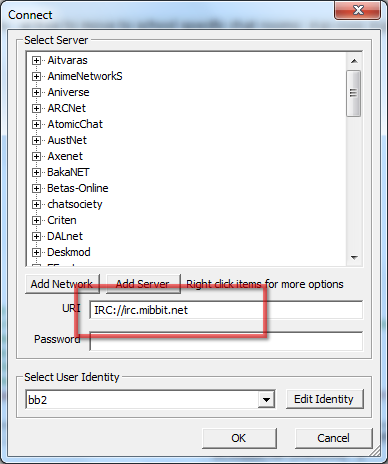
Step 3: Add the Server
And that's irc.mibbit.net (this is our chat server provider)Attachment:
server.png [ 42.77 KiB | Viewed 10871 times ]
Step 4: Join the GMAT Club Channel
Our channel is #gmatclub. You can type this into the command line (that's the chat text line and yes, you can type commands in there). So, the command to join the GMAT Club channel is: /join #gmatclubIf you do not want to remember/do this every time you logon, do what I did - save this link/channel it to your favorites.
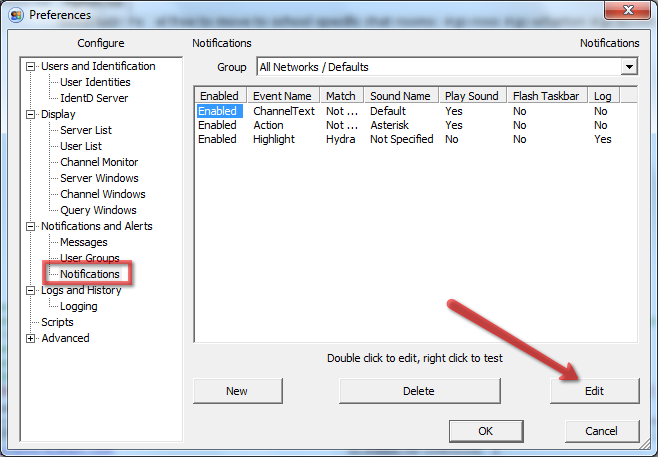
Step 5: Configure Sound Notifications
They are disabled by default so you will have to enable themAttachment:
sound-notifications.png [ 69.79 KiB | Viewed 10808 times ]
P.S. If you guys end up downloading the HydraIRC and liking it, please post here/let me know - I will make a donation to the developer for each user/member.

souvik101990
 Expert
Alum
Joined: 19 Mar 2012
Last visit: 15 Aug 2026
Posts: 4,309
Given Kudos: 2,326
Location: United States (WA)
Concentration: Leadership, General Management
Schools: Ross '20 (M)
GMAT 1: 760 Q50 V42
GMAT 2: 740 Q49 V42 (Online)
GMAT 3: 760 Q50 V42 (Online)
GPA: 3.8
WE:Marketing (Non-Profit and Government)
Products:
Expert reply
 22 Dec 2012, 23:26
Kudos
Bookmarks
Ahh please come on the CHAT people!
And if your workplace do not allow IRC... QUIT!
And if your workplace do not allow IRC... QUIT!
 23 Dec 2012, 03:01
Kudos
Bookmarks
Well this seems pretty nice.
I will promote this product for sure but don't you guys feel that in lieu of this Hydra should be paying me.
I will promote this product for sure but don't you guys feel that in lieu of this Hydra should be paying me.

 Some programmers are so generous to share their product for free that they rely entirely on donations. So I second the decision of BB of donating him per user, howsoever small the donation be.